Raus aus dem YAML-Chaos!
Individualisierte Kubernetes-Deployments mit Kustomize
Sebastian Sirch // Twitter @sebastiansirch // JAX 08. September 2020
About Me
Live Poll
https://unsplash.com/photos/74kShnX5zZIAgenda
Declarative to the rescue
YAMLs everywhere
Approaches
Fork & Rebase
Helm
Kustomize
What to use when?
Agenda
Declarative to the rescue
YAMLs everywhere
Approaches
Fork & Rebase
Helm
Kustomize
What to use when?
Deklarative Konfiguration
Kubernetes Architektur
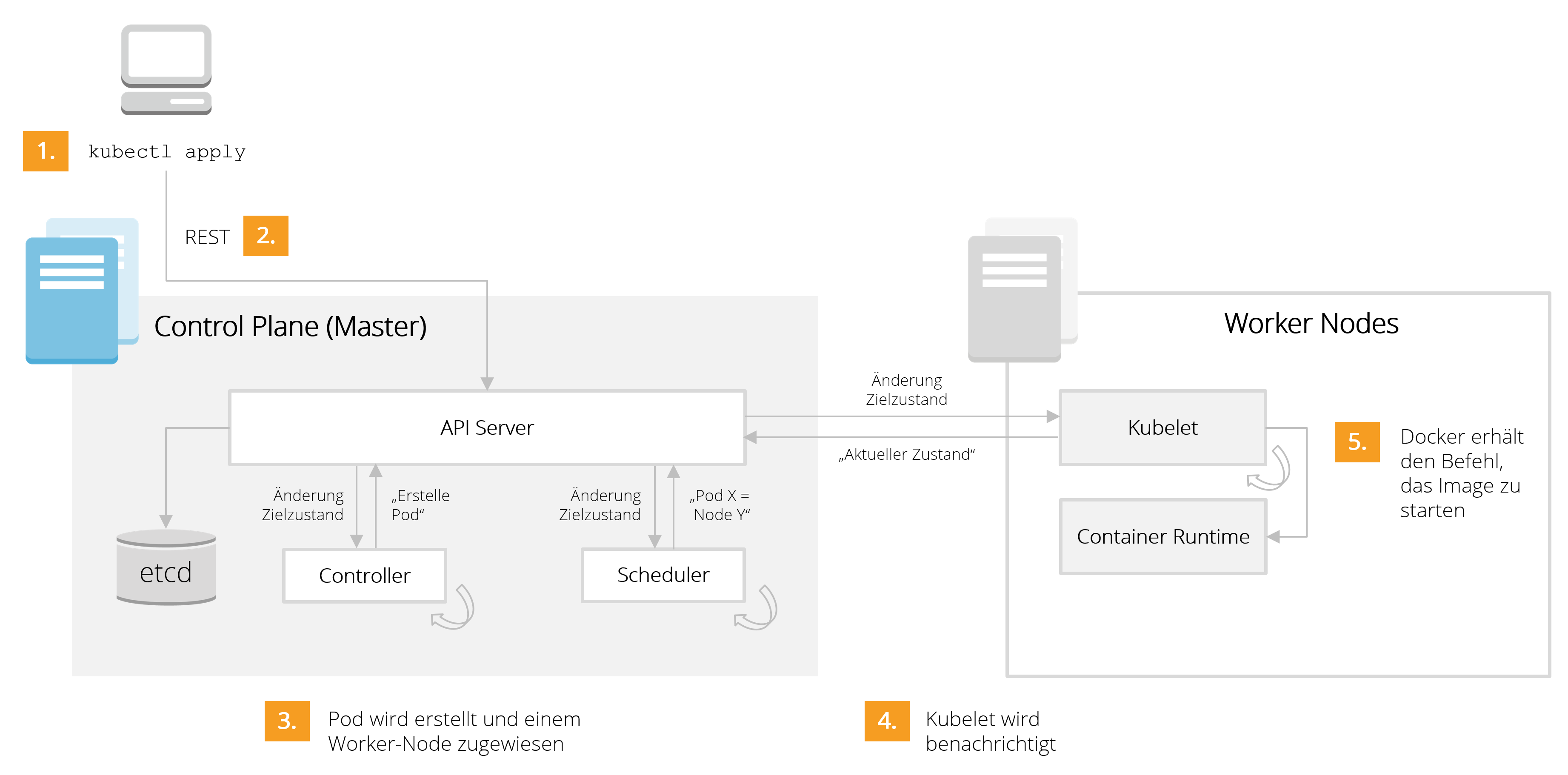
Agenda
Declarative to the rescue
YAMLs everywhere
Approaches
Fork & Rebase
Helm
Kustomize
What to use when?
Typisches Deployment
- Init Containers
- Sidecars
- Umgebungsvariablen
- Volumes
- Health Checks
- Ressource Requests/Limits
...das können schon mal >>300 Zeilen sein
Beispiel
Microservices
Bei einer YAML-Datei bleibt es nicht...
- Deployment (inkl. Sidecars)
- ConfigMaps
- Secrets
- Service
- Ingress
- RBAC
- Network Policy
...und aus wievielen Microservices besteht deine Anwendung?
Alle Umgebungen gleich?
https://unsplash.com/photos/KmKZV8pso-sRealität
https://unsplash.com/photos/hG26UoUfU9sNotwendige Flexibilität
- Umgebungsabhängig (statisch?)
- Umgebungsvariablen (z.B. DB-Connection, Credentials,...)
- Init-Container (z.B. Laden von Testdaten in DEV)
- Volumes (z.B. StorageClass)
- Ingress-URL
- Je Commit:
- Image-Tags
Agenda
Declarative to the rescue
YAMLs everywhere
Approaches
Fork & Rebase
Helm
Kustomize
What to use when?
Fork & Rebase
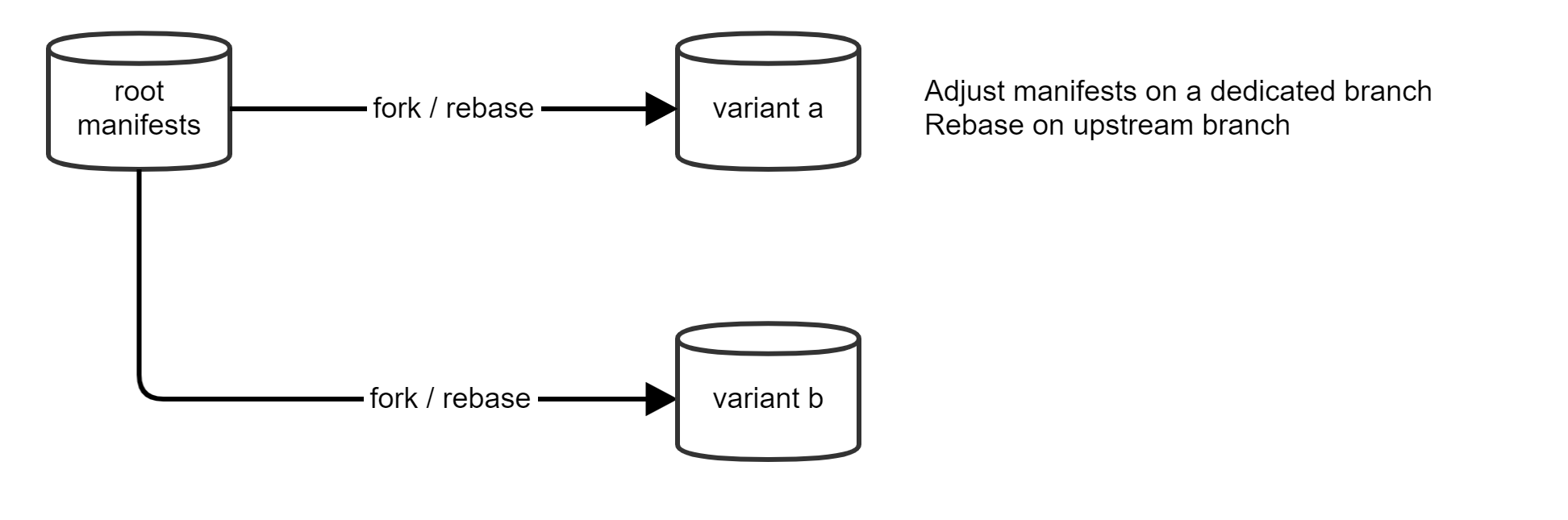
Auf den ersten Blick einfach
Beliebige Anpassungen möglich
Wartung? Merge-Konflikte? Automatisierung?
Agenda
Declarative to the rescue
YAMLs everywhere
Approaches
Fork & Rebase
Helm
Kustomize
What to use when?
Live-Demo
https://unsplash.com/photos/74kShnX5zZIHelm
Templates mit Parametern, basierend auf go:text/template
90 Templates, >3000 LOY
https://unsplash.com/photos/W_ZYCEUapF0Helm
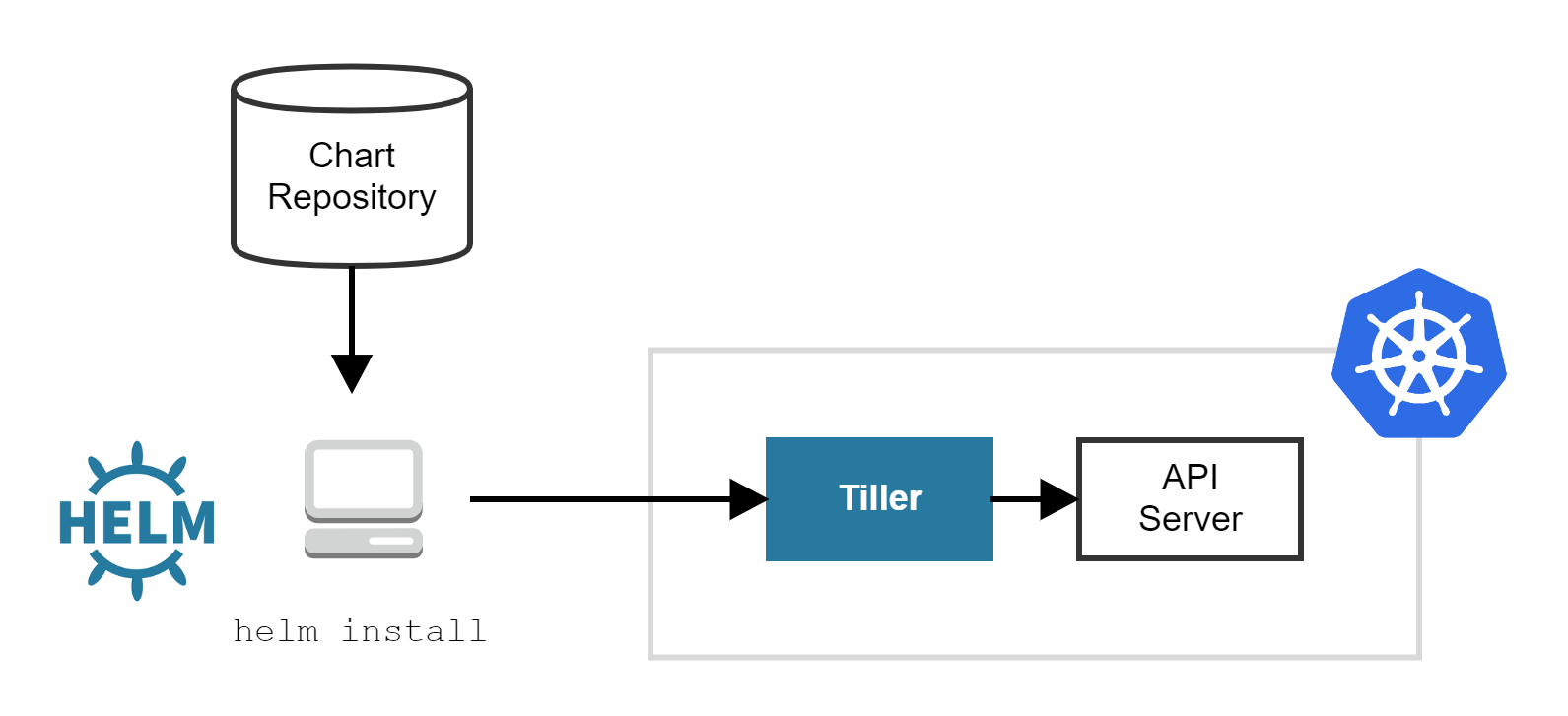
Helm v2: Tiller ist ein Security-Problem!
Helm
Wenn man nur das Template-Feature braucht:
$ helm template mychart -f values.yaml --output-dir ./manifests
$ kubectl apply --recursive -f ./manifests
GitOps!
Helm v3 verzichtet auf eine Server-Komponente.
Helm
Pro
- Viele Community Charts: https://github.com/helm/charts
- "Plug & Play"-Setups inkl. Dependencies
- Austausch von Charts,
values.yamlals API - Chart zur Bündelung aller YAML-Files einer Anwendung
Con
- Neue "Sprache"
- Schwer lesbare Dateien
- Mäßiger IDE-Support
- Alles ist ein Parameter!
- Was macht das Helm-Chart eigentlich?
- Das Chart unterstützt das Feature nicht, was ich brauche! Und nun? Fork?
helm install- deklarativ?
Agenda
Declarative to the rescue
YAMLs everywhere
Approaches
Fork & Rebase
Helm
Kustomize
What to use when?
Kustomize
... provides a new, purely declarative approach to configuration customization that adheres to and leverages the familiar and carefully designed Kubernetes API.https://kubernetes.io/blog/2018/05/29/introducing-kustomize-template-free-configuration-customization-for-kubernetes/
kustomize lets you customize raw, template-free YAML files for multiple purposes, leaving the original YAML untouched and usable as is.https://github.com/kubernetes-sigs/kustomize
Kustomize should expose and teach native k8s APIs, rather than hide them.https://github.com/kubernetes-sigs/kustomize/blob/master/docs/glossary.md
kustomize
-
Keine Templates: kustomize setzt auf eine Overlay-/Patch-Strategie
-
Deklarativ: jederzeit valide Kubernetes-YAML-Dateien ohne Platzhalter, volle IDE-Unterstützung inkl. Auto-Completion.
-
Praktische Features: Namespace, "Common-Label", ConfigMap/Secret-Änderungen
-
Flexibel und unabhängig: Das CLI-Tool kustomize rendert letztlich nur YAML-Output nach Stdout
$ kustomize build ~/someApp/overlays/production | kubectl apply -f - -
Integration: Seit kubectl v.1.14 integriert
$ kustomize build ~/someApp/overlays/production
$ kubectl -k ~/someApp/overlays/production
kustomize
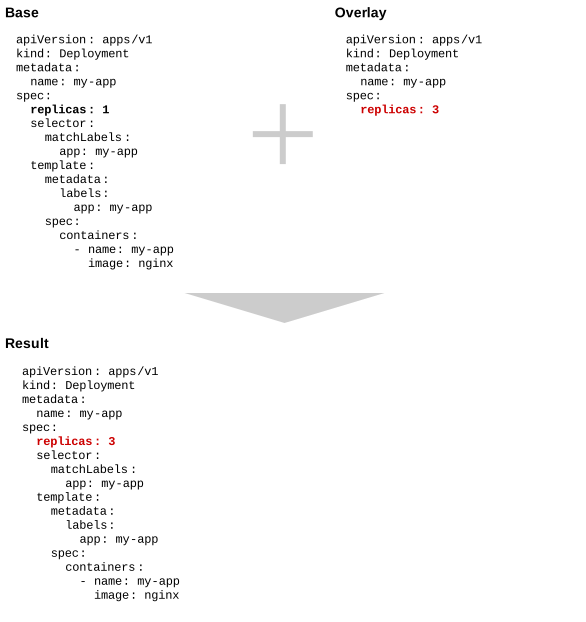
kustomize
~/my-app
├── base
│   ├── deployment.yaml
│   └── kustomization.yaml
└── overlays
    ├── prod
    │   ├── deployment_env.yaml
    │   ├── deployment_replicas.yaml
    │   ├── deployment_volume.yaml
    │   └── kustomization.yaml
    └── dev
    │   ├── kustomization.yaml
    │   └── ...
    └── ...
Live-Demo
https://unsplash.com/photos/m1WZS5ye404Kustomize in einer CI/CD Pipeline
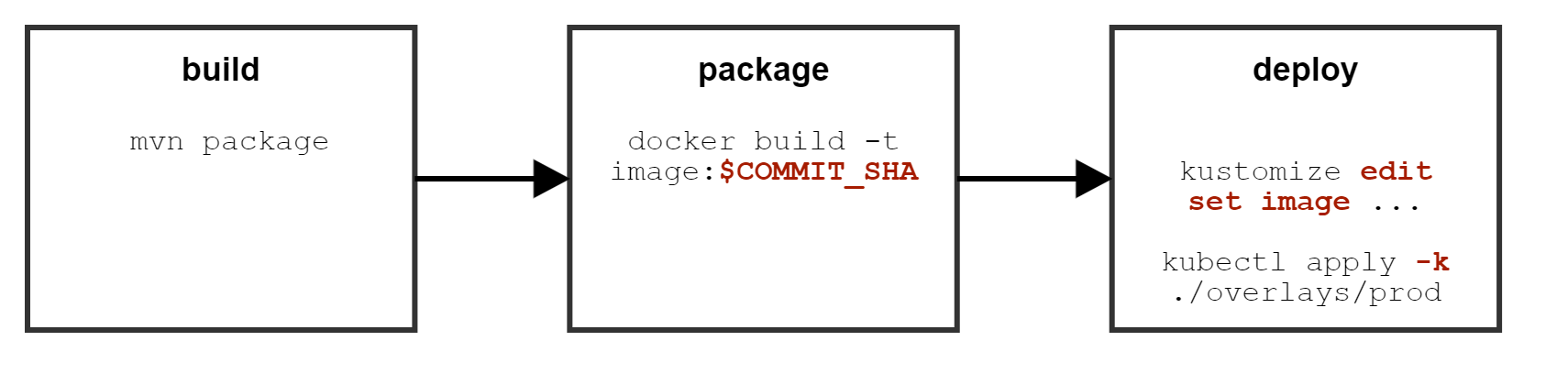
$ kustomize edit set image alpine=alpine:3.9
$ kustomize edit set image alpine=myimage:$COMMIT_SHA
# File: ./overlays/prod/kustomization.yaml
# ...

images:
- name: alpine
  newName: alpine
  newTag: "3.9"
Kustomize
Pro
- Gut lesbare Dateien, mehr Transparenz, einfachere Wartung
- Voller IDE-Support
- Insb. geeignet für "eigene" Deployments
Con
- Community-Arbeit passiert meist in Helm
- Eher für manuelle YAML-Tweaks statt "Plug & Play"-Experience
- Nur bedingt geeignet für die Auslieferung - der Anwender muss wissen, was er anpassen möchte
Realität
# kustomization.template.yaml

apiVersion: kustomize.config.k8s.io/v1beta1
kind: Kustomization

resources:
  - ../../base

namespace: __namespace__
$ sed -e "s/__namespace__/$BRANCH_SLUG/g" kustomization.template.yaml > kustomization.yaml
Kustomize & Helm
$ helm fetch --untar --version 1.3.0 --untardir ./.chart stable/nginx-ingress

$ mkdir ./base

$ helm template --values ./values.yaml --name nginx-ingress --namespace nginx-ingress-system \
  --output-dir ./base ./.chart/nginx-ingress

$ cat <<EOF > ./base/nginx-ingress/kustomization.yaml
  resources:
  — namespace.yaml
  — clusterrole.yaml
  # ...
  EOF

$ kubectl apply -k ./overlays/prod/ -n nginx-ingress-system
Von Community-Projekten profitieren
Wartbare Anpassungen mit Kustomize vornehmen
Agenda
Declarative to the rescue
YAMLs everywhere
Approaches
Fork & Rebase
Helm
Kustomize
What to use when?

https://medium.com/@sebastiansirch/why-it-is-not-about-helm-vs-kustomize-e23405de54ad
Use Cases
| Use Case (vereinfacht) | Tool |
|---|---|
| Deployment einer eigenen, abgeschlossenen Anwendung (z.B. Deployment, Service und Ingress) auf eigene Cluster |
Kustomize |
| ... mit vielen externen Dependencies | Kustomize (Dependencies unabhängig deployen) Helm (Wartungsaufwand in Kauf nehmen) |
|
Bereitstellung der Deployment-Deskriptoren einer abgeschlossenen
Anwendung für externe User (z.B. Open-Source-Projekt, Auslieferung an
Kunden)
Deployment-Deskriptoren
|
|
| Management betrieblicher Aspekte zur Laufzeit der Anwendung | Operator |
Day 1 vs. Day 2
Day 1 (Helm, Kustomize): Deployment der Artefakte ("K8s-YAML-Handling")
Day 2 (Operator): Management von (stateful) Workloads (z.B. DBs) zur Laufzeit
apiVersion: kubedb.com/v1alpha1
kind: Snapshot
metadata:
  name: instant-snapshot
  namespace: demo
  labels:
    kubedb.com/kind: Postgres
spec:
  databaseName: script-postgres
  storageSecretName: gcs-secret
  gcs:
    bucket: kubedb-qa
Typisches Vorgehen: Operator mit Helm/Kustomize installieren